Pythia

Free & open source · Oracle SQL and PL/SQL IDE

Oracle development, at native speed.

Pythia covers the daily work of an Oracle developer — writing and running SQL, editing and compiling PL/SQL, debugging, editing data, comparing schemas and watching what the database is doing — in one responsive, keyboard-first app for Windows, macOS and Linux.

Version 0.10.0 · October 30, 2026 · Windows, macOS and Linux · no sign-up

Pythia's SQL window: the object browser with tables and packages on the left, a query with syntax highlighting, and its result grid below

Connects to

  • Oracle 11.2 to 23ai
  • MySQL
  • MariaDB
  • PostgreSQL
  • SQL Server

MySQL, MariaDB, PostgreSQL and SQL Server are experimental: SQL windows, the object browser, users and roles, monitoring and maintenance, also through an SSH tunnel. The PL/SQL tools are Oracle's.

Everything an Oracle developer does all day

From the first query to the deployment script, with the shortcuts you'd expect: Ctrl+Enter, F8, F5, F12, Ctrl+Space.

An editor that knows your schema

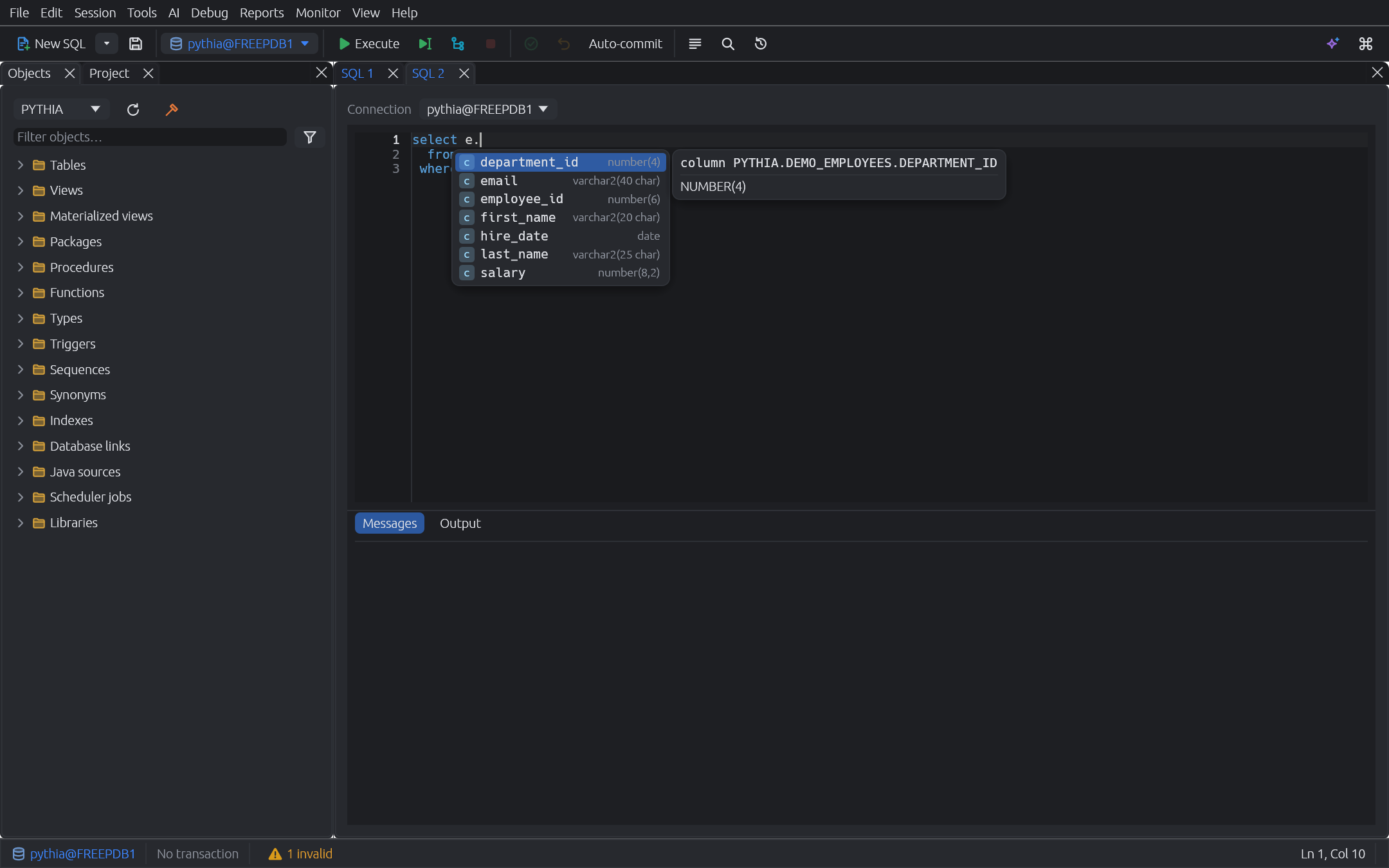
Completion with the real columns after alias., package members with their signatures, %ROWTYPE and cursor records. Go to definition — also into the database — references, rename, live diagnostics, multi-cursor and code folding.

SQL windows that keep up

Run the statement under the cursor, the selection or the whole script. A virtualized grid sorts, filters, charts and exports to CSV, Excel, JSON or INSERTs, and follows foreign keys to parent and child rows.

Edit data without locking it

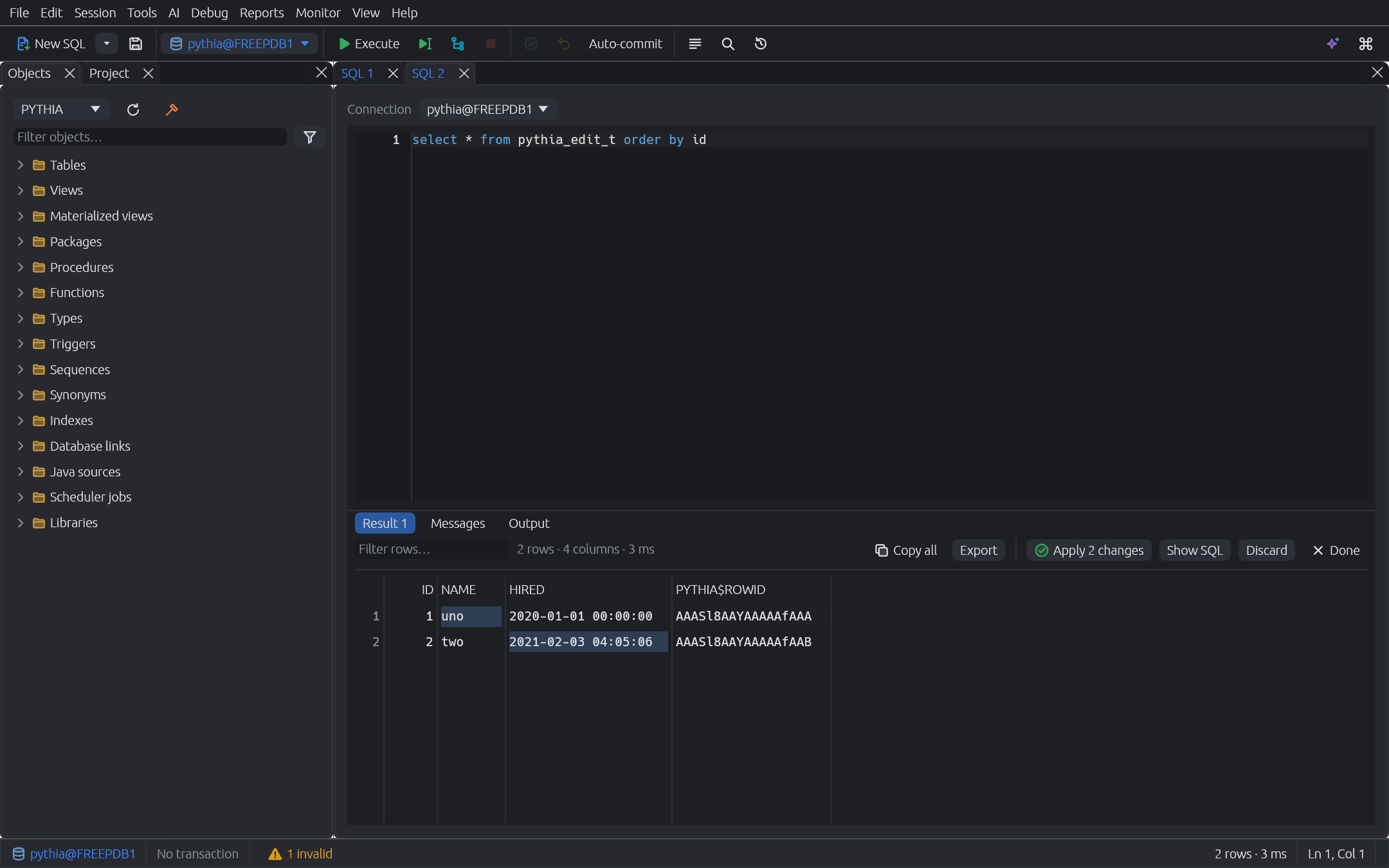
Change query results in place, with no FOR UPDATE: changes are checked against the values you fetched, so someone else's update is reported instead of overwritten. Show SQL previews the DML.

PL/SQL from spec to body

Program windows with spec and body, compile errors you can click, an outline and a formatter your team can share. Test… writes a ready-to-run block for any procedure or function — records, collections and ref cursors included.

A debugger that sets itself up

Conditional breakpoints, step into, watches, Run to Cursor, and values you change while stopped. Hover a selection like l_order.lines(i) to see that element. At every stop it checks the plans of the SQL the code just ran, marks a misestimate on its line and lets the plan button blink; a click shows the real plan beside the code, estimated and actual rows side by side. When the database can't connect back, Debugger Setup finds out why — grants, ACL, host name, firewall — and fixes it. A profiler too.

See what the database is doing

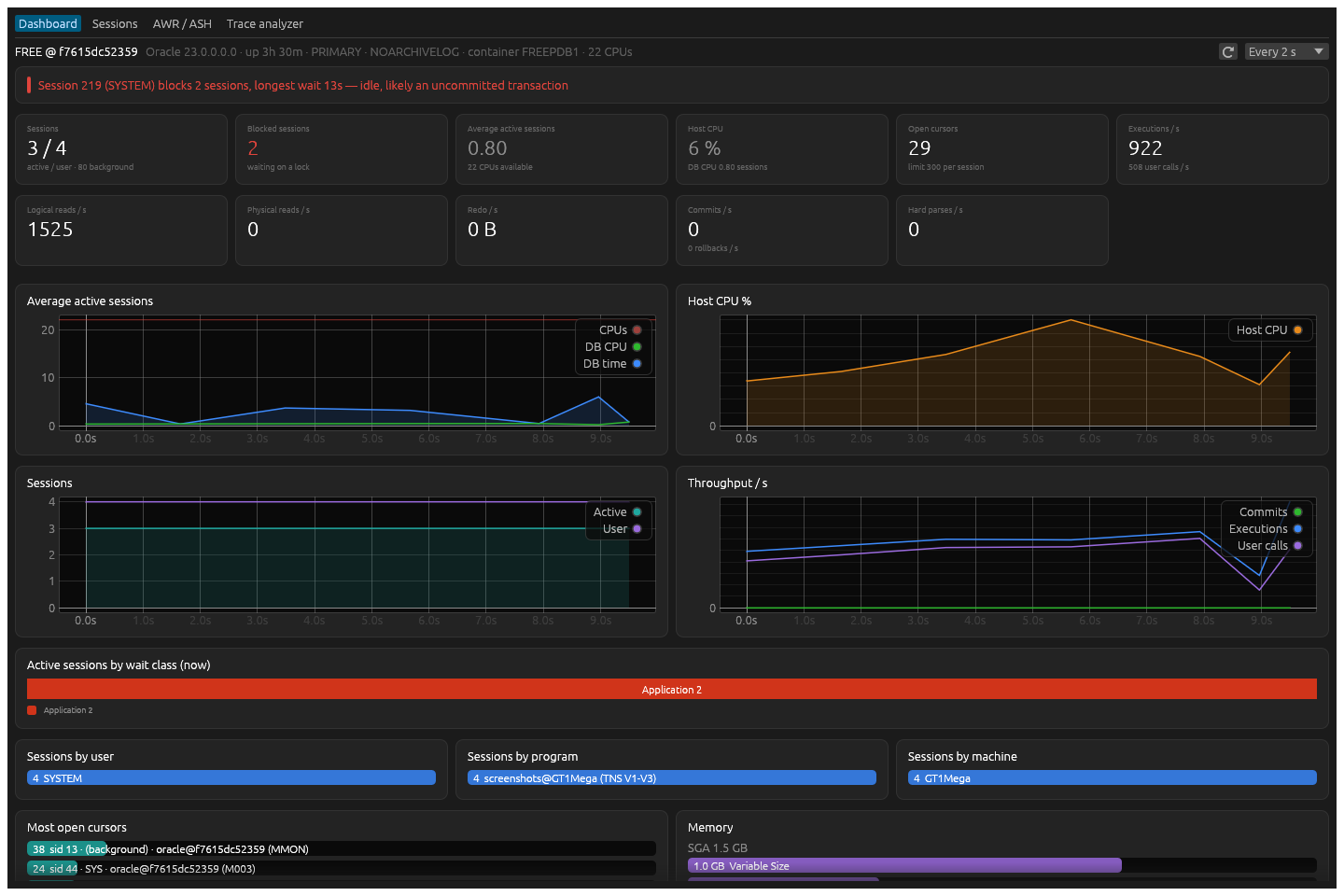
A dashboard that says it plainly — “session 175 blocks 2 sessions, likely an uncommitted transaction” — the blocking tree, sessions and SQL with their plans and binds, ASH, AWR and SQL Monitor reports, tkprof for traces.

AI with the model you choose

Anthropic, any OpenAI-compatible API, a local model (Ollama, llama.cpp, LM Studio) or a command line tool. Generate SQL from your real tables, fix errors, explain plans. Each answer shows what was sent.

Compare, import, maintain

Schema compare with ordered sync scripts, data compare by key, CSV and Excel import with type inference, table export, and a maintenance scan for stale statistics, unusable indexes and dead rows.

Your code under version control

Open a folder as a project with its git status, compare a file with its object in the database, export a schema as one file per object, and deploy what changed in dependency order.

The debugger stopped at a breakpoint in a package body, with the call stack, variables and watches in tabs below the code
Debugger. Stopped at a breakpoint, with the call stack, variables and watches in tabs you can arrange.
The monitoring dashboard: findings at the top, KPIs and live charts below
Monitoring. Findings first, then the numbers behind them.
Editing rows of a query result in the grid, with changed cells marked
Editing results. In place, checked against what you fetched.
Completion offering the columns of a table after its alias, with their types
Completion. Live from the data dictionary.
A project file compared side by side with its object in the database
Projects. A file next to its object in the database.
The scheduler jobs window listing jobs with their state, schedule, last and next run
Scheduler jobs. State, schedule and recent runs.

Safe on production

Built for databases where mistakes are expensive.

  • A session per window. Every window has its own session and transaction, and the status bar always shows what's pending.
  • Production in red. Production connections are marked red and ask before a commit. Connections can be read-only.
  • Passwords in your keychain. Database passwords and API keys live in the system's keychain, never in Pythia's files.
  • No locks behind your back. Editing a result doesn't hold rows locked while you type; maintenance tasks ask first on production.
  • AI sees what you allow. Table definitions and plans go with a request; result rows and bind values only if you turn it on.
  • Nothing phones home. No telemetry, no account, no update checks — and no analytics on this site.
  • No Oracle client to install. A built-in driver written in Rust: Easy Connect, tnsnames.ora and proxy users work as they are.
  • Open source. Every line is on GitHub, under MIT or Apache-2.0.

New in 0.10.0

  • A quieter debugger. The SQL plan no longer opens by itself in the middle of stepping. On a misestimate the toolbar's plan icon blinks and shows ⚠ with the number of flagged statements, and a program window the debugger opens comes without the outline (#169, #170).
  • Conditional compilation without false errors. The editor reads each $IF's first branch as the code, and Format keeps statements with $IF as written (#171, #172).
  • A filter for the outline of a program window, for large packages (#173).
  • Modifier keys behave. Shift, Ctrl or Alt on its own no longer scrolls the editor to the caret, and Settings → Keyboard waits past the modifiers for the key (#175, #176).

Release notes for 0.10.0 · All changes, version by version

Download Pythia

Free for everyone. Version 0.10.0, released October 30, 2026.

Connects to Oracle on its own — take this one unless you need the Instant Client.

For Oracle 11.2, servers that require Native Network Encryption, and OS or wallet logins. Needs Oracle's Instant Client installed (see the FAQ).

Every file's SHA-256 is in SHA256SUMS.txt. Older versions are on the releases page. Prefer to build it yourself? cargo build --release

First launch: “Windows protected your PC” or “Pythia can't be opened”?

The packages aren't code-signed yet, so Windows and macOS ask once before they run Pythia.

  • Windows: click More info, then Run anyway.
  • macOS: open Pythia once and close the message, then go to System Settings → Privacy & Security and click Open Anyway next to Pythia. If macOS says the app is damaged, run xattr -dr com.apple.quarantine /Applications/Pythia.app in Terminal.
  • Linux: make the AppImage executable first: chmod +x pythia_*.AppImage.

Help make it better

Pythia is young and moves fast. Found a bug, or missing something from the tool you used before? Tell us — every report is read.

Questions

Is Pythia free?

Yes, for personal and commercial use. It's open source under the MIT or Apache-2.0 license, with no account, license key or paid edition.

Do I need an Oracle client?

No. Pythia talks to Oracle with a built-in driver written in Rust. Easy Connect strings (host:port/service) work as they are; for net service names, point TNS_ADMIN at the folder with your tnsnames.ora, and the one of an Oracle Client that's already installed is found the way Oracle finds it.

Which download should I take?

The one with the built-in driver, unless you connect to Oracle 11.2, to a server that requires Native Network Encryption (connecting fails with “Native Network Encryption and Data Integrity”), or with OS or wallet logins (/@alias). For those, take the Instant Client download and install Oracle's Instant Client (Basic or Basic Light) on the library path. Installing one replaces the other; your settings and connections stay.

Which Oracle versions does it work with?

Pythia is developed against Oracle 23ai and tested against 18c and 21c; Oracle 11.2 works with the Instant Client download. A few features need a newer release: the profiler needs 18c, reading trace files through the database 12.2.

What about MySQL, MariaDB, PostgreSQL and SQL Server?

They're experimental: SQL windows with results, explain plan and completion, the object browser, users and roles, sessions, monitoring dashboards and maintenance, also through an SSH tunnel. Their drivers are built in too. The tools that rest on PL/SQL and Oracle's dictionary — debugger, profiler, schema compare and others — stay on Oracle.

Does Pythia send my data anywhere?

Only to your databases, and to the AI model you set up when you use the assistant. Requests carry table definitions, statistics, plans and source; result rows and bind values only if you allow it in Settings → AI, and each answer shows what was sent. There's no telemetry and no account.

Does it run under WSL?

Yes, under WSLg. Pythia opens its window through X11 there; on a scaled display, size it with Settings → UI scale or Ctrl + and Ctrl −.

Try it on your own schema.

Free, open source, and ready in a minute — on Windows, macOS and Linux.