TaskCraft

Free & open source · Self-hosted issue and project management

Plan, track and ship.
On your own server.

TaskCraft brings boards, sprints, backlogs, timelines, reports and automation together in one fast, keyboard-friendly app. You run it next to your code and your docs: one binary and PostgreSQL, no per-seat pricing, no data leaving your network.

Docker, Kubernetes or a single binary · comes with sample projects to explore · no sign-up

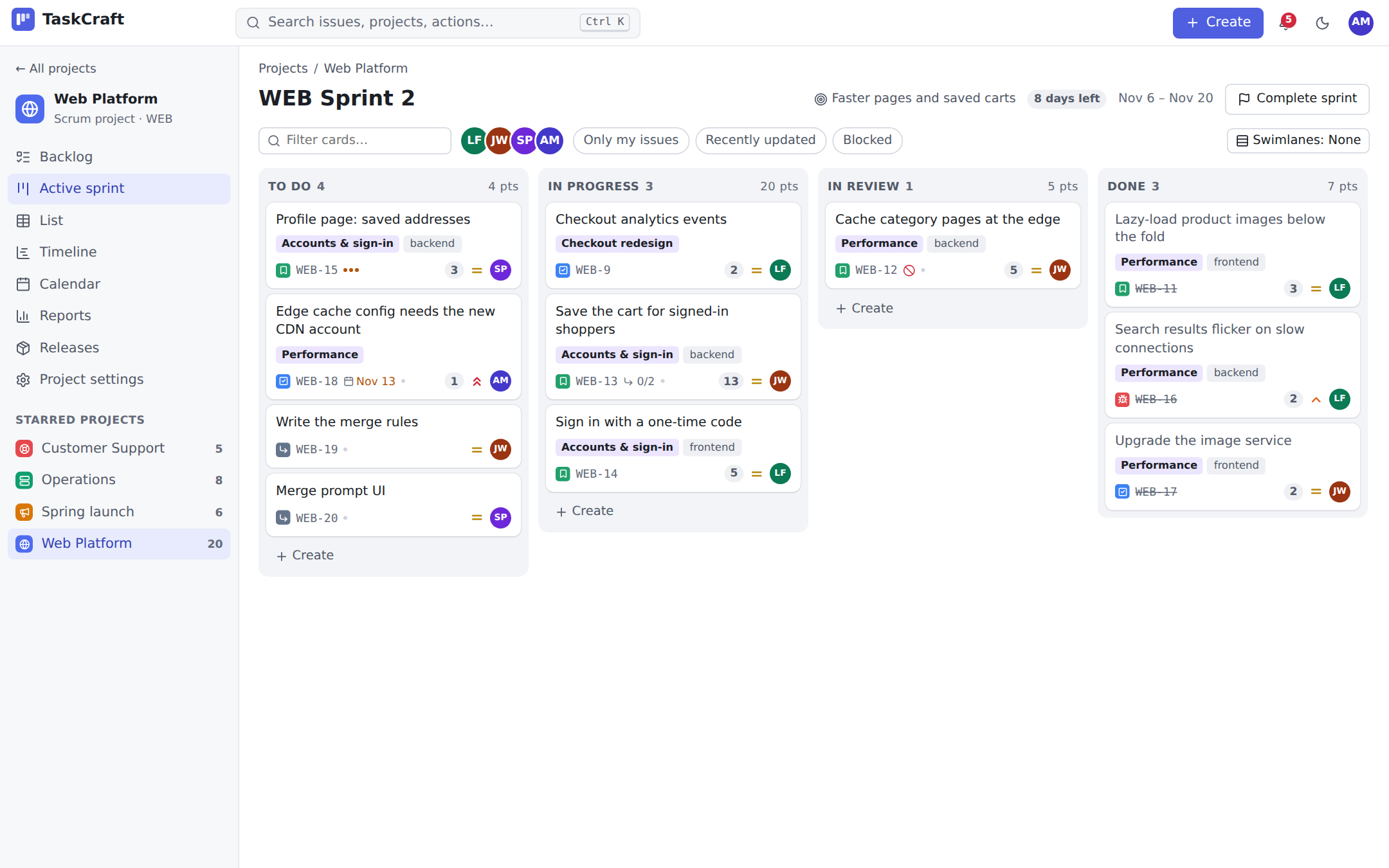
TaskCraft's sprint board: columns To do, In progress, Review and Done with issue cards showing priority, story points, assignees and due dates, quick filters above

One tool for every way of working

  • Scrum sprints
  • Kanban flow
  • Issue tracking
  • Service desk
  • Work plans

Every project starts from a template with its own statuses, issue types and board, and you change them as you go.

Everything a team needs from idea to release

From the first ticket to the release notes, with the shortcuts you'd expect: c creates an issue, Ctrl K finds anything.

Boards that keep the flow honest

Drag cards between columns, set WIP limits, split the board into swimlanes by person, epic or priority, and see at a glance which cards have been sitting still too long. Quick filters and a person filter one click away.
Sprints from planning to review

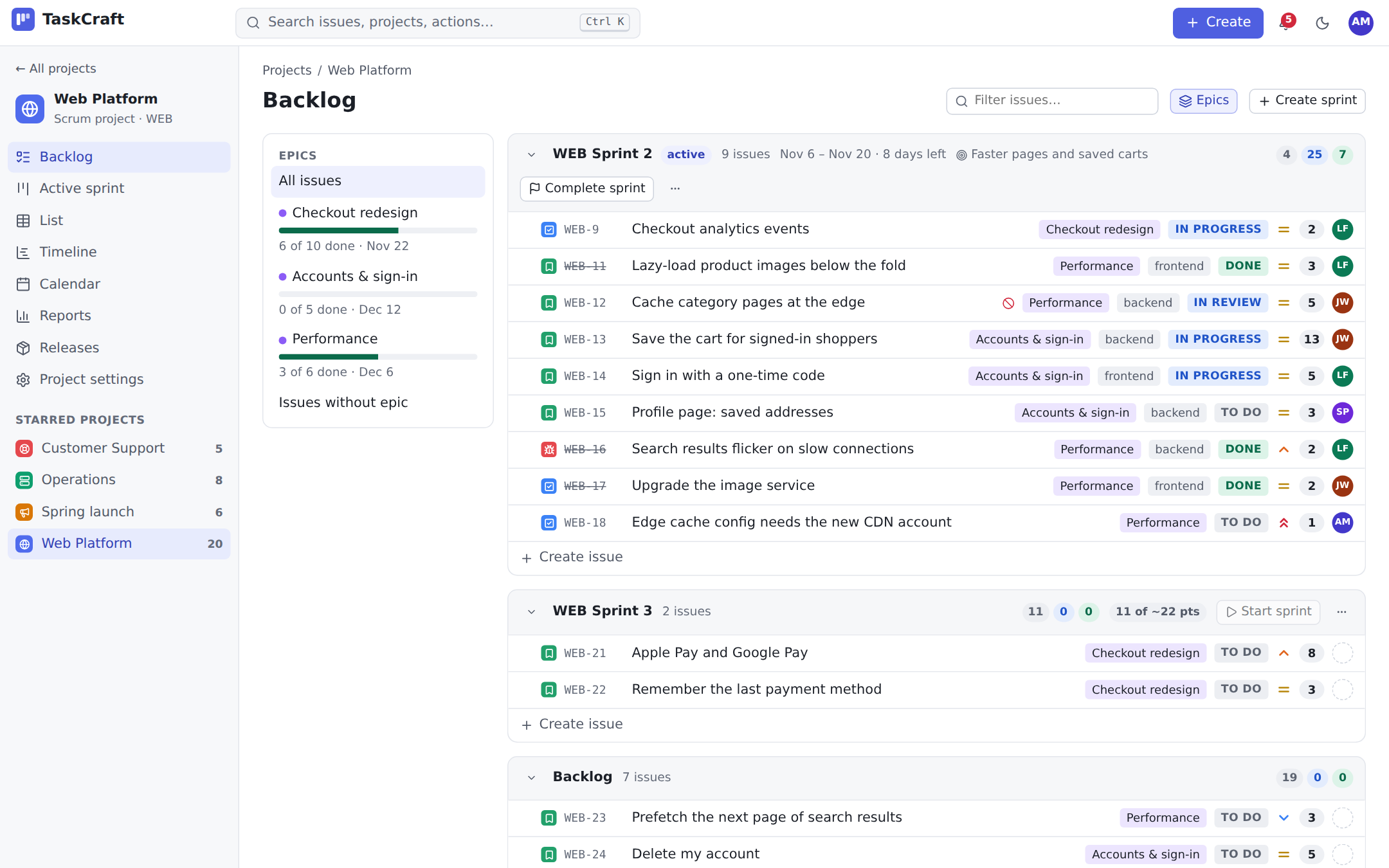
Rank the backlog, drag issues into a sprint and get a planning hint from your recent velocity. Completing a sprint moves unfinished work on and keeps the numbers for the velocity chart.

One query language everywhere

project = WEB and sprint in openSprints() and assignee = me() — the same language drives lists, boards, saved filters, dashboards and automation conditions, with completion as you type.

Reports replayed from history

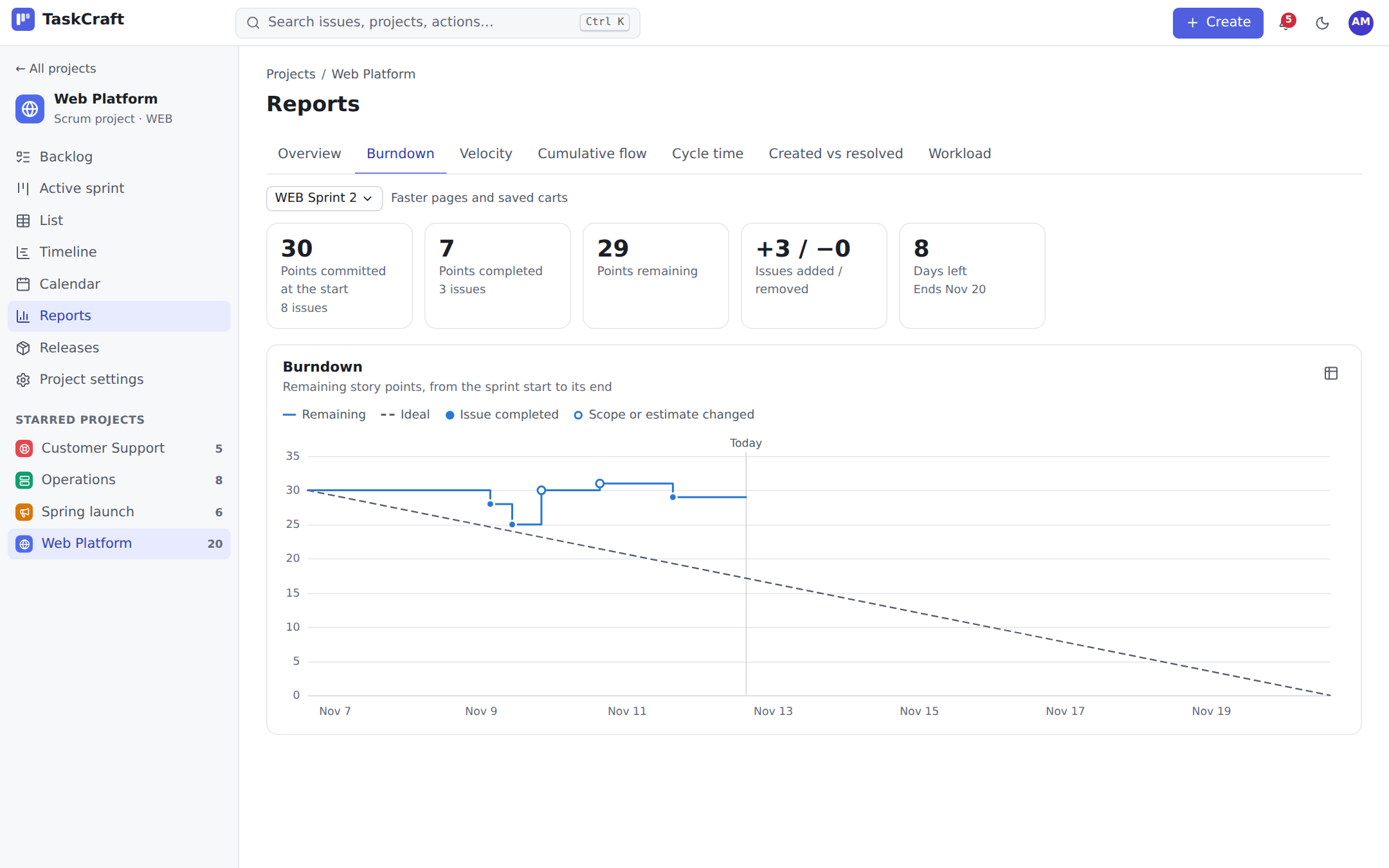
Burndown with scope changes, velocity, cumulative flow, cycle and lead time, created vs resolved, workload. Every change is recorded, so reports stay right even when estimates change mid-sprint.

Dashboards and a portfolio

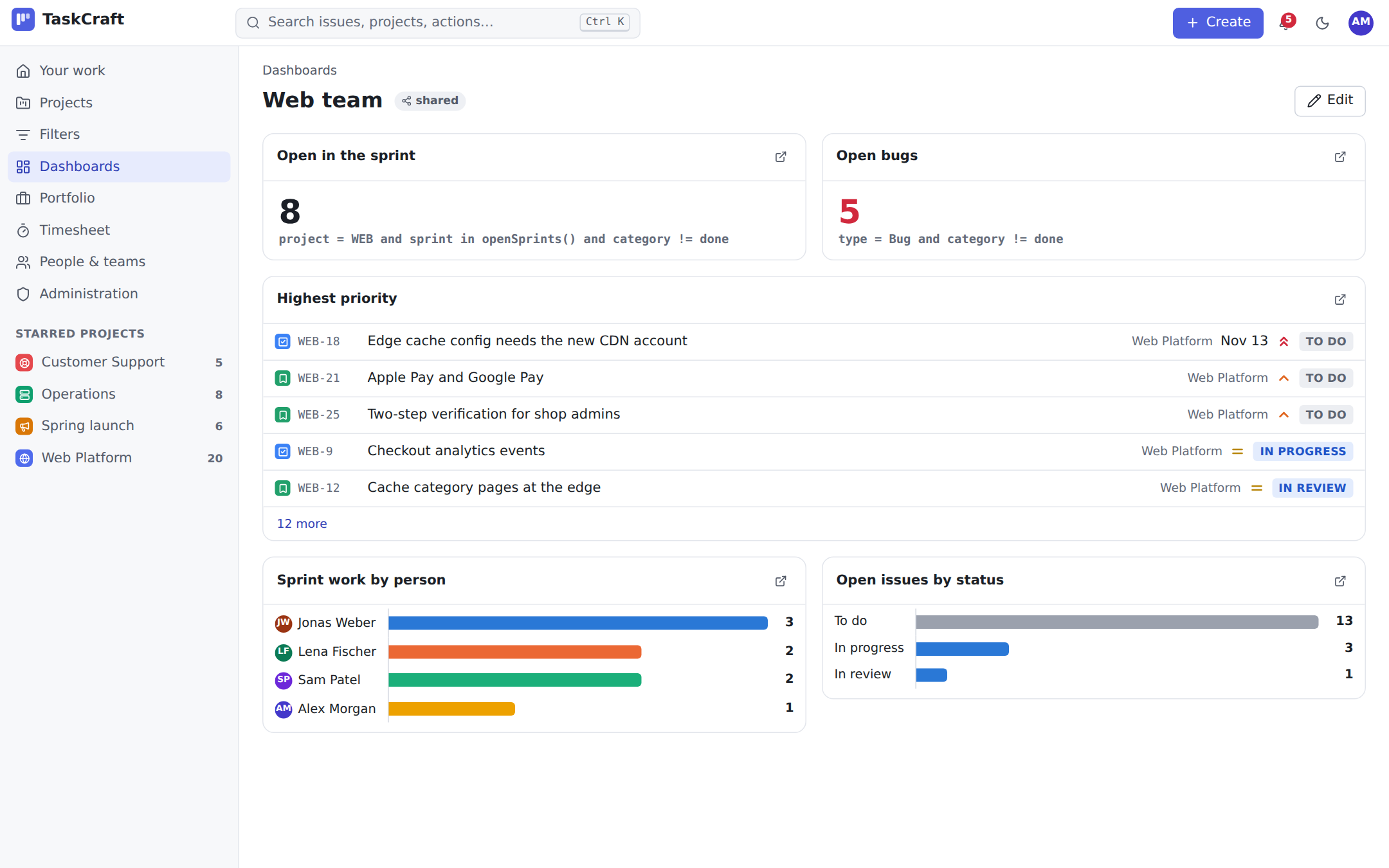
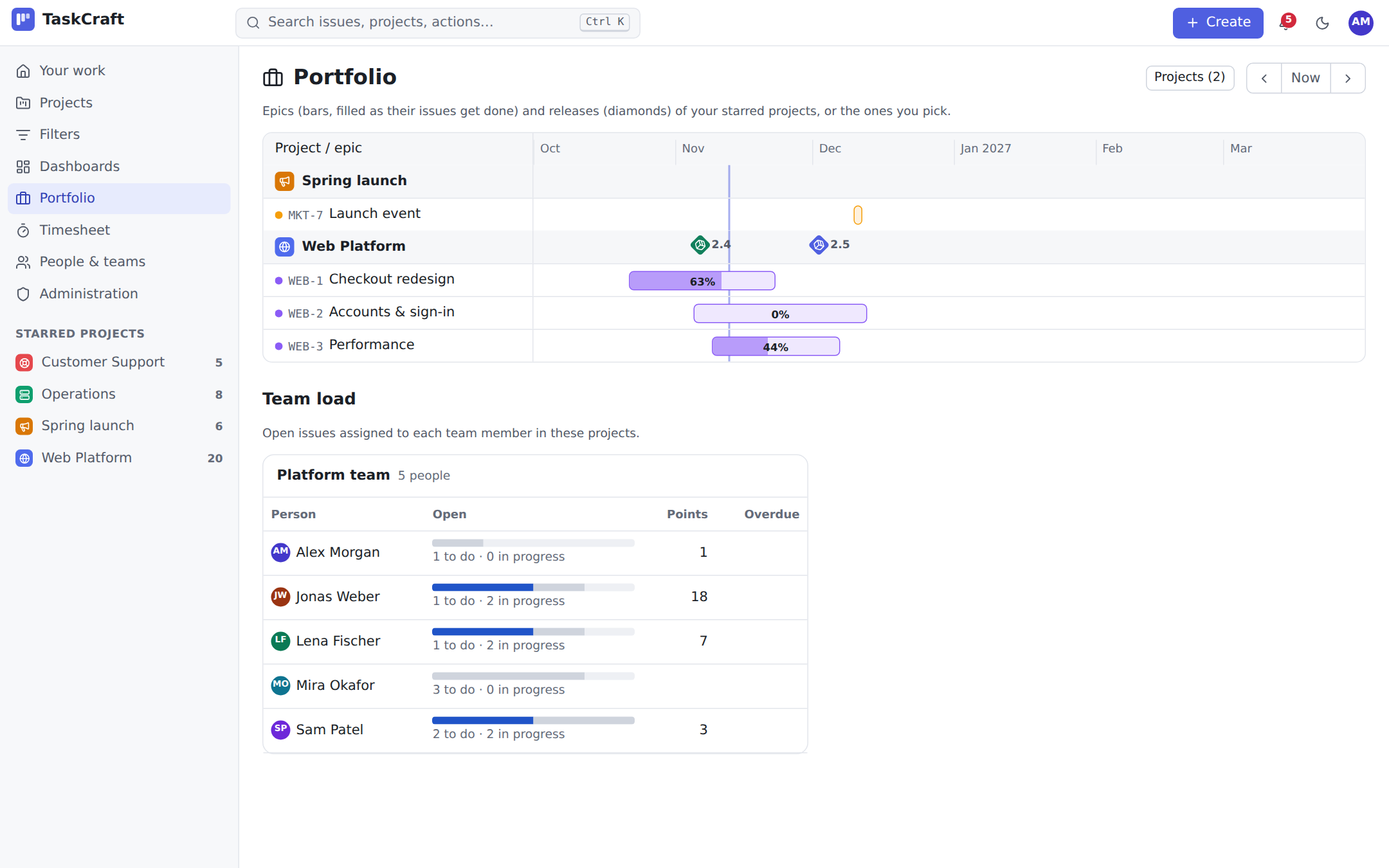
Compose dashboards from lists, counts, breakdowns and charts — every number opens the issues behind it. The portfolio puts the epics and releases of several projects on one timeline, next to each team's load.

Automation that does the chores

When an issue is created, moves or gets a comment: assign, label, transition, comment or notify. Or on a schedule — “every weekday at 08:00, remind the assignees of what's due tomorrow” — in your time zone.

A service desk that keeps its promises

Customers write by e-mail: a message becomes an issue, their replies become comments and your answers go back by mail. Service-level goals per priority, a queue with the most urgent first, and templates and recurring issues for the routine work.

Docs next to the work

With WikiCraft, issues link wiki pages with live titles, each project gets its own space, and sprint reviews, specs and release notes are written for you. The wiki shows live issue tables from any query.

Built for developers — and their assistants

Commits, branches and pull requests link themselves by issue key, and a merged pull request can move the issue on. A complete API, signed webhooks, and an MCP server so AI assistants work with issues under each person's own permissions.

The backlog: a running sprint and the next one with their issues, story points and the planning hint from velocity
Backlog. Rank, plan sprints, see your velocity.
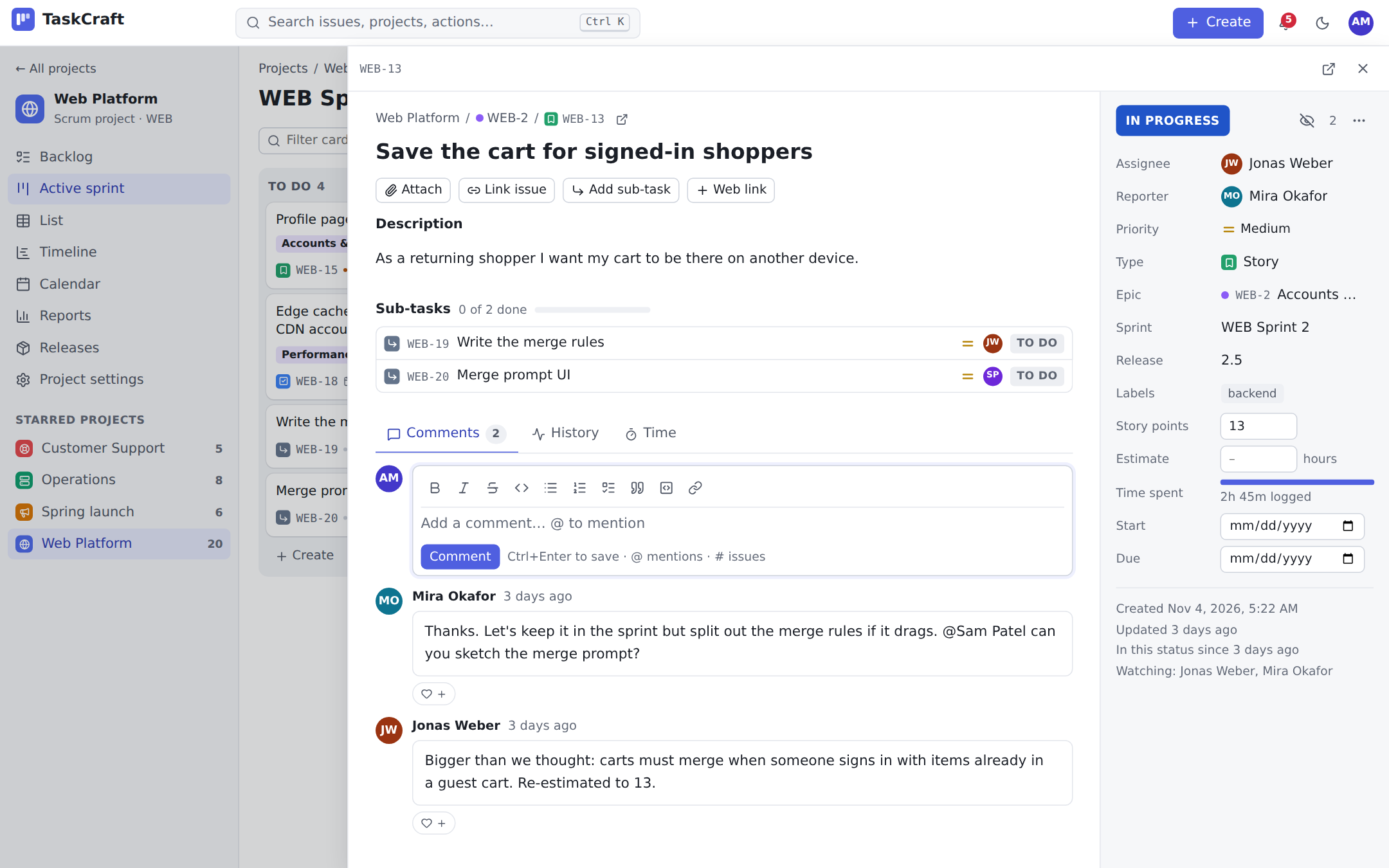
An issue open in the side panel with its description, checklist, fields, sub-tasks and activity
Issues. Rich text, sub-tasks, links, time and history.
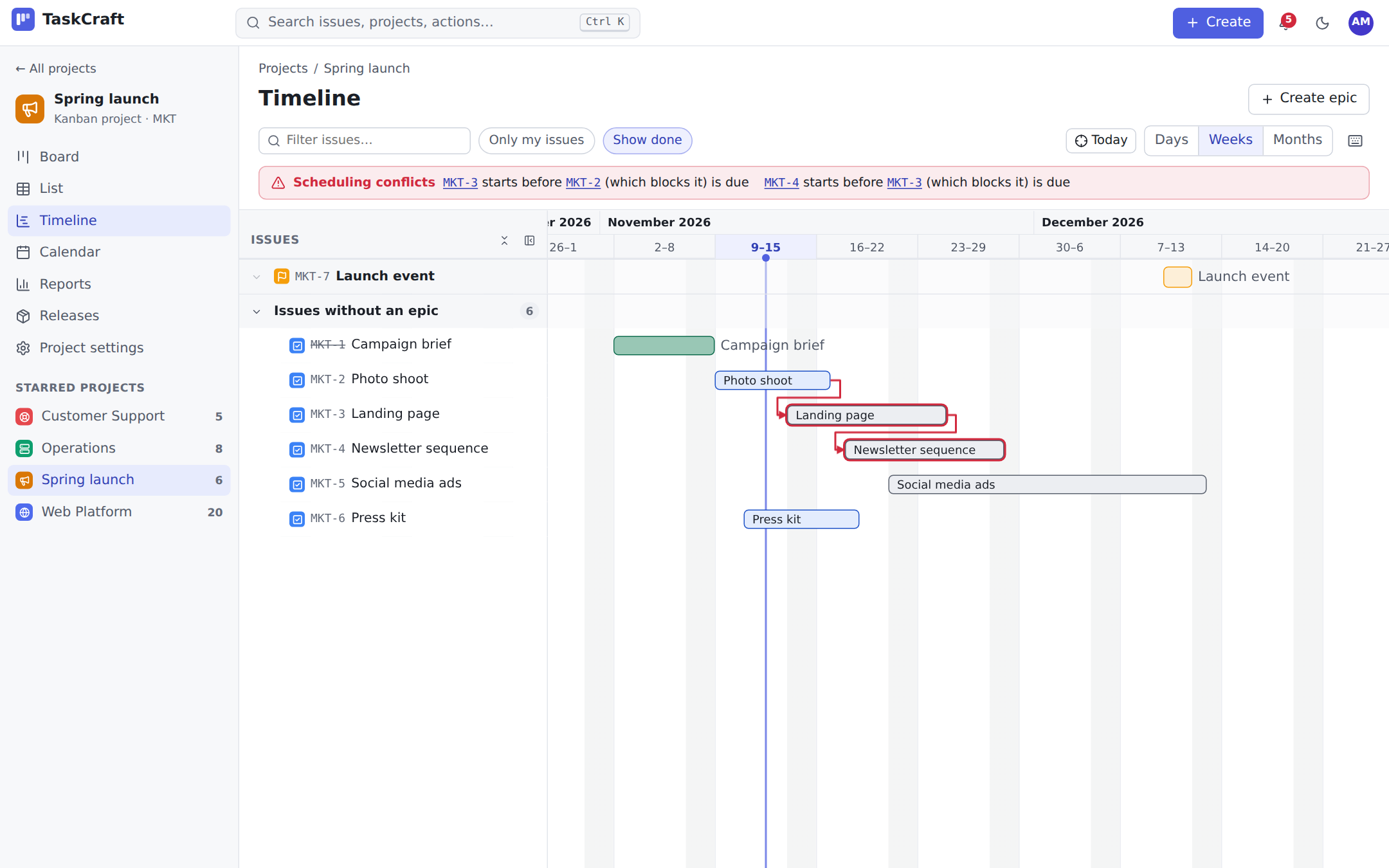
The timeline: epics and issues as bars across weeks with dependency arrows between them
Timeline. Drag to reschedule, with dependency warnings.
The sprint burndown chart with the ideal line and the remaining work per day
Reports. Burndown, velocity, flow and more.
A team dashboard with counts, a list of assigned issues, open issues by status and recent activity
Dashboards. Put together from widgets and filters.
The portfolio: epics of several projects as progress bars on one timeline, release markers, and the team's load below
Portfolio. All projects and teams on one page.

Yours to run, yours to keep

TaskCraft is made to be cheap to operate, easy to back up and comfortable for everyone on the team.

  • One binary and PostgreSQL. Attachments on disk or in any S3-compatible storage. Runs on a small server, works without internet access.
  • From one container to a cluster. Several replicas share nothing but the database; live updates, automation and e-mail coordinate through PostgreSQL.
  • Backups in one file. taskcraft backup takes the database and the attachments while the server keeps running; a restore also moves between versions and storage backends.
  • Your sign-in. OpenID Connect, GitHub, LDAP / Active Directory and SAML, with groups mirrored into teams. Two-factor authentication and passkeys.
  • Permissions that fit. Owners, admins, members and guests; project roles for people and teams; read-only API tokens; an audit log.
  • Comfortable for everyone. Keyboard shortcuts, light, dark and high-contrast themes, a phone layout, English, German, French and Italian — checked against WCAG 2.2 AA.
  • Bring your history. CSV import with column mapping and a dry run; keys from the old tool keep working as links.
  • No telemetry. TaskCraft talks to nobody but the services you configure.

Run it

The first visit sets up the workspace — with sample projects to explore if you like.

Docker Compose

TaskCraft and PostgreSQL on one machine.

git clone https://github.com/ortic/TaskCraft.git
cd TaskCraft
export TASKCRAFT_DB_PASSWORD=$(openssl rand -hex 16)
docker compose up -d
# open http://localhost:8788

Kubernetes

Several replicas, attachments in S3, nightly backups.

cp deploy/kubernetes/secret.example.yaml \
   deploy/kubernetes/secret.yaml
# set database, bucket and host name, then
kubectl apply -k deploy/kubernetes

From source

Rust, Node and PostgreSQL 15 or newer.

cd web && npm install && npm run build && cd ..
cargo build --release
TASKCRAFT_DATABASE_URL=postgres://… \
  ./target/release/taskcraft serve

Configuration is a handful of environment variables — base URL, database, storage, e-mail, sign-in — described in the README.

Better together with WikiCraft

TaskCraft's companion wiki: specs, sprint reviews and release notes written from your issues, live issue tables on any page, and every page that mentions an issue listed on it.

Questions

Is it really free?

Yes. TaskCraft is open source under the MIT or Apache-2.0 license, with no paid edition, no user limits and no features held back.

Can we bring our issues from the tool we use now?

Most tools export CSV. TaskCraft's import suggests which column goes into which field, matches statuses, types, people, sprints and releases by name, tests the import before running it, and keeps the old keys working as links.

How big a team can it handle?

TaskCraft is light on resources and starts on a small server. When you need more, run several replicas behind a load balancer; they need no sticky sessions and share nothing but the database.

Does it need internet access?

No. The web app is built into the binary and TaskCraft only connects to the services you configure — your mail server, your sign-in provider, WikiCraft, webhooks.

How do we back it up?

taskcraft backup writes the database and the attachments into one file while TaskCraft keeps running; taskcraft restore brings it back, also into a newer version or onto other storage. The Kubernetes setup runs it every night. A regular PostgreSQL backup works too.

Can AI assistants use it?

Yes, through the built-in MCP server: an assistant can search, read, create and update issues, log work and run reports — always with the permissions of the person whose token it uses, and read-only tokens stay read-only.

Which languages does it speak?

English, German, French and Italian, with dates and numbers in each person's format. Every text is in a JSON catalog, so adding a language needs no code.

Try it with your next sprint.

Free, open source, and running in two minutes.